
If your USB connection drops, your software freezes, or your speakers buzz when you transmit, stray RF is probably getting into your cables. Clip-on ferrite chokes are one of the cheapest fixes in ham radio, and every digital-mode station should have a handful.
Level: Beginner | Time: About 10 minutes
What You’ll Need
- Mix 31 clip-on ferrites, a good choice for HF.
- Reusable cable ties to keep them from sliding.
Step 1: Find the Problem Cables
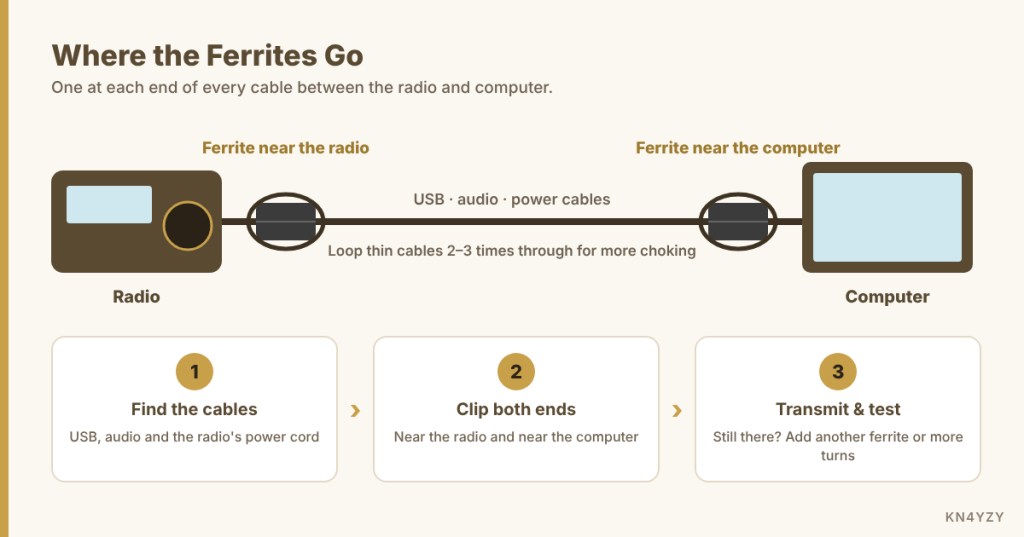
Start with the cables that run between your radio and computer: the USB cable, audio cables, and the power cord to the radio. These are the usual paths for RF.
Step 2: Clip Them On at Both Ends
Snap a ferrite on each cable near where it plugs into the radio, and another near the computer. If the cable is thin enough, loop it through the ferrite two or three times before closing it. More turns give more choking.
Step 3: Test It
Transmit at your normal power and watch for the problem you had before. If it’s better but not gone, add another ferrite or a few more turns.
Gotchas
- Not all ferrites are alike. Cheap unmarked ones may do little on HF. Look for the mix number.
- Ferrites help, but they’re not a cure-all. Persistent problems can point to grounding or antenna feedline issues worth a closer look.
Your Turn
What’s the strangest RF problem you’ve chased down in your shack? Share it in the comments, or ask if you’re fighting one now.
As an Amazon Associate we earn from qualifying purchases. This site supports local ham clubs.

Leave a Reply