
The FT-991A is an HF radio that also does 2 meters and 70 centimeters, which makes it a great shack radio for checking into the local nets. The catch is that programming a repeater by hand isn’t obvious the first time. Here’s how to set up the frequency, shift and tone, and save it to a memory channel so you never have to do it again.
Level: Beginner | Time: About 10 minutes | Note: Menu numbers can shift between manual versions, so I give the menu names below. Scroll to the name on your radio rather than trusting a number from the internet.
What You’ll Need
- Your FT-991A
- A dual-band VHF/UHF antenna on the radio’s VHF/UHF antenna jack
- The repeater’s output frequency, offset direction and CTCSS tone (from your club or a repeater directory)
Step 1: Select FM and Tune the Repeater
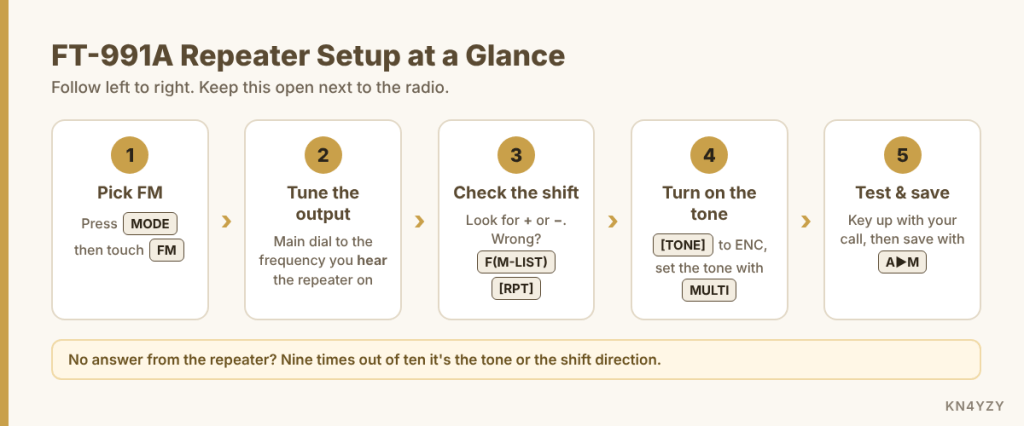
Press MODE and touch FM on the screen. Then tune the main dial to the repeater’s output frequency, the one you hear it on. You’ll want regular FM here, not C4FM, for an analog repeater.
Step 2: Check the Shift
The radio has Automatic Repeater Shift (ARS), so on most standard 2m and 70cm repeater frequencies it sets the shift for you. Look for a + or – on the display.
If it’s wrong, press F(M-LIST) and keep touching [RPT] on the screen. It steps through SIMP, + and –. The standard offset is 600 kHz on 2 meters and 5 MHz on 70 cm in the US. Those amounts live in the menu items named RPT SHIFT 144MHz and RPT SHIFT 430MHz if you ever need to change them.
Step 3: Turn On the Tone
Most repeaters need a CTCSS tone before they’ll let you in. With the F(M-LIST) screen still up:
- Keep touching [TONE/DCS] until it shows ENC. That sends the tone when you transmit. (CTCSS sends it and keeps your receiver quiet unless the repeater sends the same tone back. Start with ENC.)
- Touch [FWD] to go to the next page of functions, then touch [TONE].
- Turn the MULTI knob to the repeater’s tone, like 100.0 or 131.8.
Step 4: Test It
Key up and give your call sign. If the repeater is set up to send a courtesy tone or an ID, you’ll hear it come back when you let go of the mic. No response? Double-check the tone and the shift direction first. Those two cause almost every “I can’t hit the repeater” problem.
Step 5: Save It to a Memory Channel
- Briefly press A▶M. A memory channel number appears.
- Turn the MULTI knob to pick an empty channel.
- Press and hold A▶M until you hear a double beep. It’s stored, along with the shift and tone.
To get back to it later, press V/M to switch to memory mode, then press F(M-LIST), touch [MCH], and turn the MULTI knob to the channel. Press V/M again to go back to VFO.
Gotchas
- Holding A▶M overwrites whatever was in that channel. Check that the channel is empty before you hold the key.
- Picking CTCSS instead of ENC. If the repeater doesn’t send a tone back, CTCSS mode will keep your speaker silent and you’ll think nobody’s there.
- Odd-split repeaters. ARS only knows the standard band plan. If your repeater uses an unusual offset, set the direction yourself with [RPT] and check the offset amount in the menu.
Your Turn
Which local repeater was the first one you saved in your FT-991A? Let me know in the comments. If you’ve got a Yaesu question, ask it there too, and check out the other How-To posts while you’re here.
As an Amazon Associate we earn from qualifying purchases. This site supports local ham clubs.

Leave a Reply